Build a SwiftUI Dendrobates atlas to understand ArrangementView on iPhone Duo: split, overlay, shared state and real simulator screenshots.
A phone that folds gives us more screen. It also takes away a few comfortable assumptions. Frogs manage to fold their legs without opening the SwiftUI documentation. Let’s see whether we can learn something from them.
Until now, adaptive layout often came down to one question: “How much space do I have?” With iPhone Duo, we also need to ask where that space is. A large flat surface, two regions divided by a fold, a smaller outer display: the same pixels do not serve the same purpose.
With iOS 27.1, Apple introduces ArrangementView, a SwiftUI container for organising two related pieces of content. To understand what changes, I built FrogAtlas, a small atlas of poison frogs. Species accounts, photographs and a map. And frogs colourful enough to give us a break from the blue rectangles in layout samples. 🐸
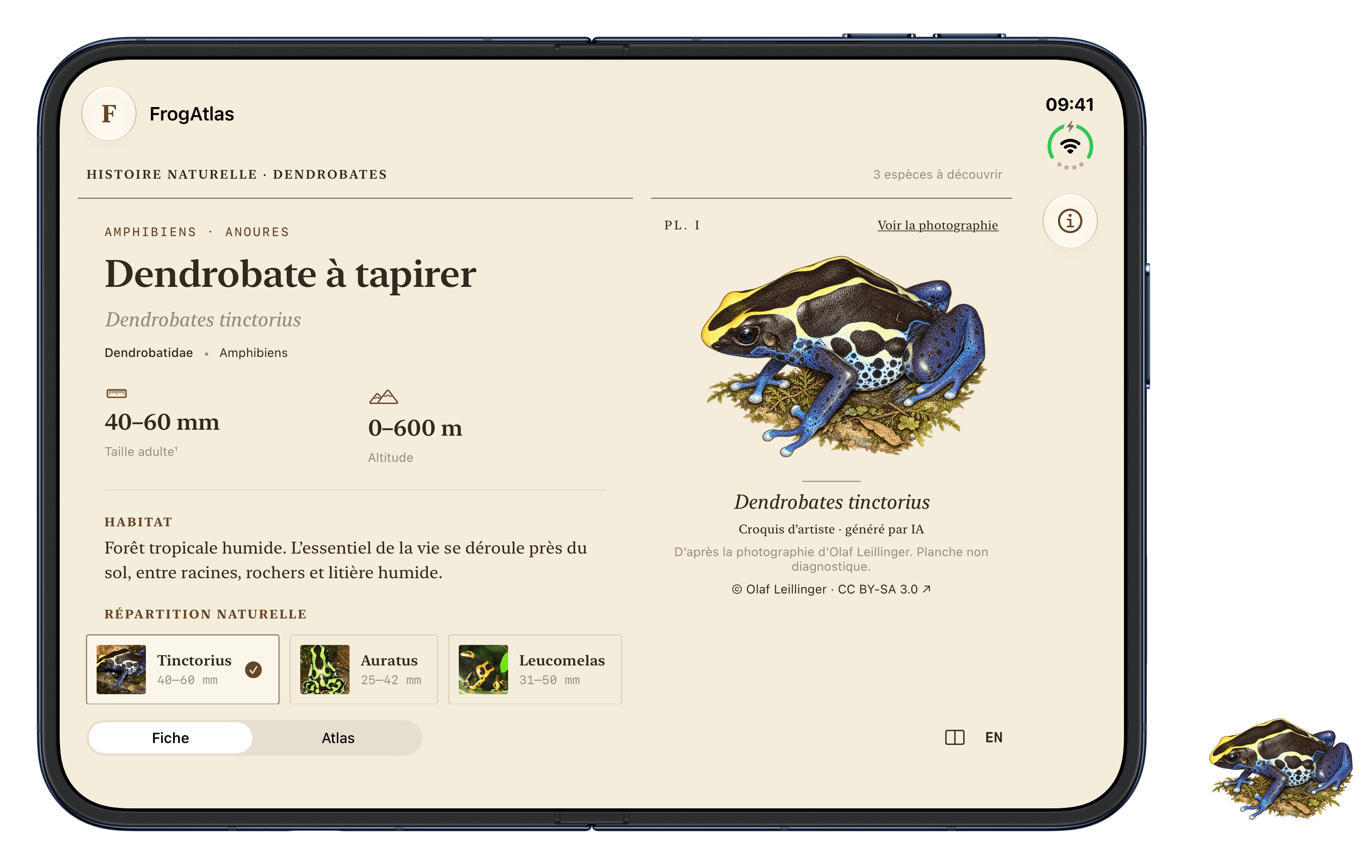
I gave the app the feel of an old natural history encyclopedia: ivory paper, serif type, fine rules and captioned plates. An AI-generated drawing of D. tinctorius, based on a credited photograph, accompanies the reference images. “View photograph” takes us back to the source image. Think old natural history volume, with a table of contents you can tap.
The screenshots in this article come from that application running in the iPhone Duo simulator on iOS 27.1. They show the software rendering, not an ergonomics test on physical hardware. Apple’s official device frames make the outer display, flat inner display and book position easier to distinguish. A few residents of the terrarium have also found their way into the margins.
Welcome to the terrarium
FrogAtlas features three species: Dendrobates tinctorius, Dendrobates auratus and Dendrobates leucomelas. A selection for the demonstration, not a complete inventory of the genus. Three species, three outfits, and no complaints about my typography.
The data comes from the French Wikipedia article on Dendrobates and its individual species accounts. These are amphibians in the family Dendrobatidae, associated with tropical rainforests in Central and South America. The genus gives us context; the species accounts provide the measurements, habitat and distribution.
A small taxonomic detour is needed. The genus page still combines “five species” with a list that includes D. azureus. Amphibian Species of the World places that name in the synonymy of D. tinctorius. In the app, the blue “azureus” form therefore remains part of that species. A spectacular colour does not, on its own, create a new species. Even a very good blue.
The interface has a straightforward job. I select a frog, read its account and look at its photograph. Then I move to the map to locate the regions where the species occurs.
On a flat display, the account and photograph can sit together. In a book-like posture, the fold imposes a division. On the outer display, I mainly want a readable account and a way to select another species. Building each screen separately would be easy enough. Keeping them coherent through transitions is the harder part.
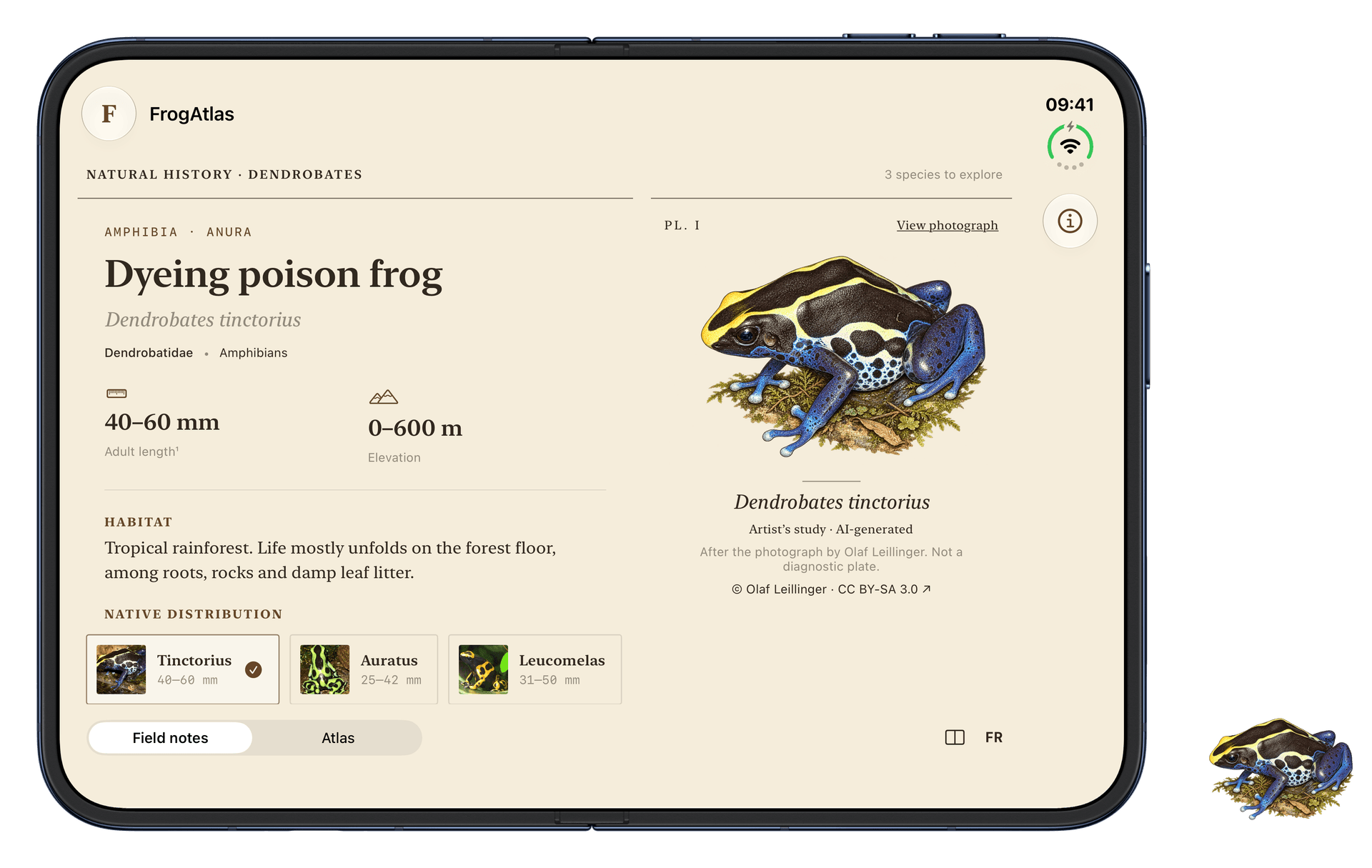
FrogAtlas, split style on the flat inner display. Artist’s plate generated with AI after Olaf Leillinger’s photograph, CC BY-SA 3.0. The original photograph remains available in the app. Full image credits appear below.
Two related views, one layout responsibility
ArrangementView takes a primary view and a secondary view. The style describes their spatial relationship. The container then makes layout decisions using the context: available proportions, size classes and reserved regions, including the fold.
Let’s start with the account and photograph:
enum AppLanguage {
    case french
    case english
}

NavigationStack {
    ArrangementView {
        FrogInformationView(frog: frog, language: .english)
    } secondary: {
        FrogPhotographyView(frog: frog, language: .english)
    }
    .arrangementViewStyle(.split)
}
The AppLanguage enum belongs to our application. The language parameter makes the selected language explicit: .french or .english.
FrogInformationView and FrogPhotographyView are components in our application. The container and style come from SwiftUI. These snippets target iOS 27.1; an application supporting earlier versions needs an alternative behind an availability check.
The .split style divides the available space between the views. In the basic case Apple demonstrates, a container wider than it is tall favours a horizontal split; one taller than it is wide favours a vertical split. Reducing this to “large screen versus small screen” would miss part of the point.
What interests me is the responsibility we move. The account describes its information. The photograph presents its image. The container decides how they fit together. I no longer need to repeat that decision in every component.
Navigation keeps its own job
Despite what the name might suggest, ArrangementView does not provide navigation. The catalogue, destinations and back navigation still belong to the usual containers.
In this example, NavigationStack wraps the arrangement. I avoid putting a NavigationSplitView or TabView inside it to make it perform a job it was not designed for. I also avoid placing the arrangement in a large ScrollView around the entire page. The species account can, however, scroll within its own allocated region.
Apple’s adaptive layouts session explains this distinction between navigation, layout and content.
Sharing the terrarium: the layout ratio
Half for the account, half for the image: a starting point, not a requirement. Here, the account contains text and benefits from a little more room. Dendrobates tinctorius is not a name that travels light.
ArrangementView {
    VStack(spacing: 0) {
        FrogInformationView(frog: frog, language: .english)
    }
    .splitArrangementLayoutRatio(0.60)
} secondary: {
    FrogPhotographyView(frog: frog, language: .english)
}
.arrangementViewStyle(.split)
The detail that matters: apply the modifier to the child whose preference you are expressing, rather than to the entire ArrangementView. That is also how the splitArrangementLayoutRatio documentation demonstrates it.
We are asking for roughly 60% of the space for the account. The ratio applies along the chosen split axis. It does not promise 60% of the screen in every posture: layout constraints, priorities and the physical division still matter.
The single-child VStack provides a region root in the demo, with the component reading the arrangement context beneath it. There is a practical lesson here: check what environment values actually do at runtime, rather than stopping when the code compiles.
Let the account respond to the container’s decision
A wide account can show measurements in two separate blocks. A smaller region calls for a shorter presentation. The information remains available; its formatting changes.
struct FrogInformationView: View {
    @Environment(\.splitArrangementAxis)
    private var arrangementAxis

    let frog: Frog
    let language: AppLanguage

    var body: some View {
        ScrollView {
            VStack(alignment: .leading) {
                Text(frog.scientificName)
                    .italic()

                if arrangementAxis == .horizontal {
                    FrogCharacteristicsGrid(frog: frog)
                } else {
                    FrogCharacteristicsSummary(frog: frog)
                }
            }
        }
    }
}
FrogCharacteristicsGrid and FrogCharacteristicsSummary stand for two presentation variants here. The important part is the question we ask the system: which axis is the arrangement using?
splitArrangementAxis is optional. Outside a split arrangement, it can be nil. In this example, the condensed presentation also provides a reasonable fallback for that case.
I do not need to ask which iPhone model is running the app or scatter width thresholds through the code. This does not remove every need for measurement. It avoids measuring again what the container has already decided.
Small screen, frog out of frame
On a narrow surface, I may prefer to keep only the account. The style lets us restrict the supported axes:
ArrangementView {
    FrogInformationView(frog: frog, language: .english)
} secondary: {
    FrogPhotographyView(frog: frog, language: .english)
}
.arrangementViewStyle(.split.axes(.horizontal))
If the container cannot divide the space along the permitted axis, the primary view remains on its own. This is a functional decision as much as a visual one.
The photograph complements the account. The species selector lets someone keep exploring the app. I therefore keep the selector outside the secondary content that may disappear.
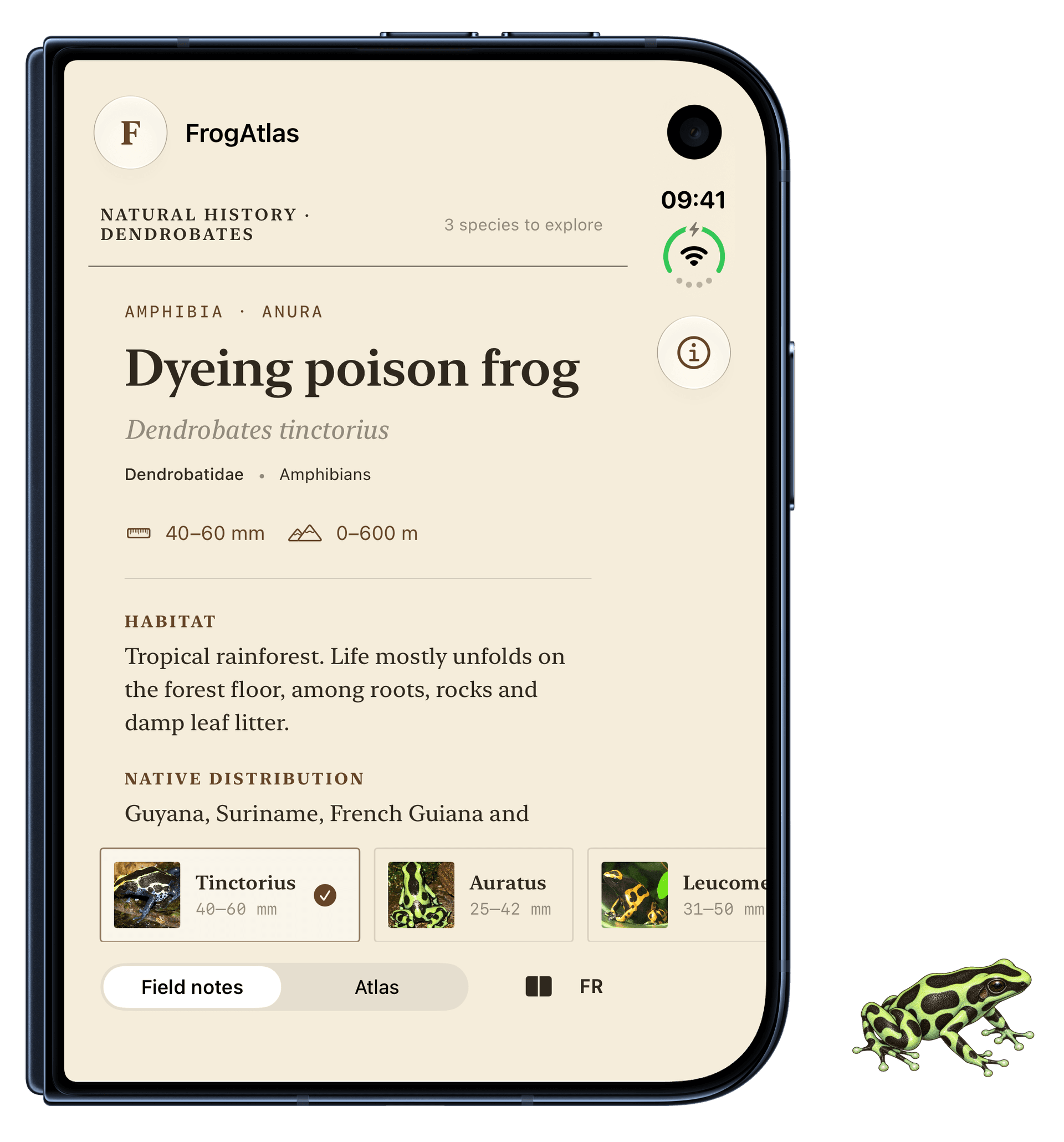
Outer display, horizontal splitting only. The large image steps aside; the account and species selection remain accessible.
There is a nuance specific to our example. The photograph can disappear while someone reads a textual description. In a field identification app, it might be essential. “Secondary” describes a priority within a task, not a permanent category of content.
Map in the background, frog in the foreground
Now for the atlas. This time, I want to explore a map with a small card in the foreground. The .overlay style expresses that relationship.
ArrangementView {
    VStack(spacing: 0) {
        FrogSelectionPanel(frog: selectedFrog, language: .english)
    }
} secondary: {
    FrogWorldMap(selectedID: $selectedID, language: .english)
}
.arrangementViewStyle(.overlay)
With this style, the primary view sits in the foreground. The map is the secondary view, even though it occupies most of the visible space. Primary does not mean “largest”.
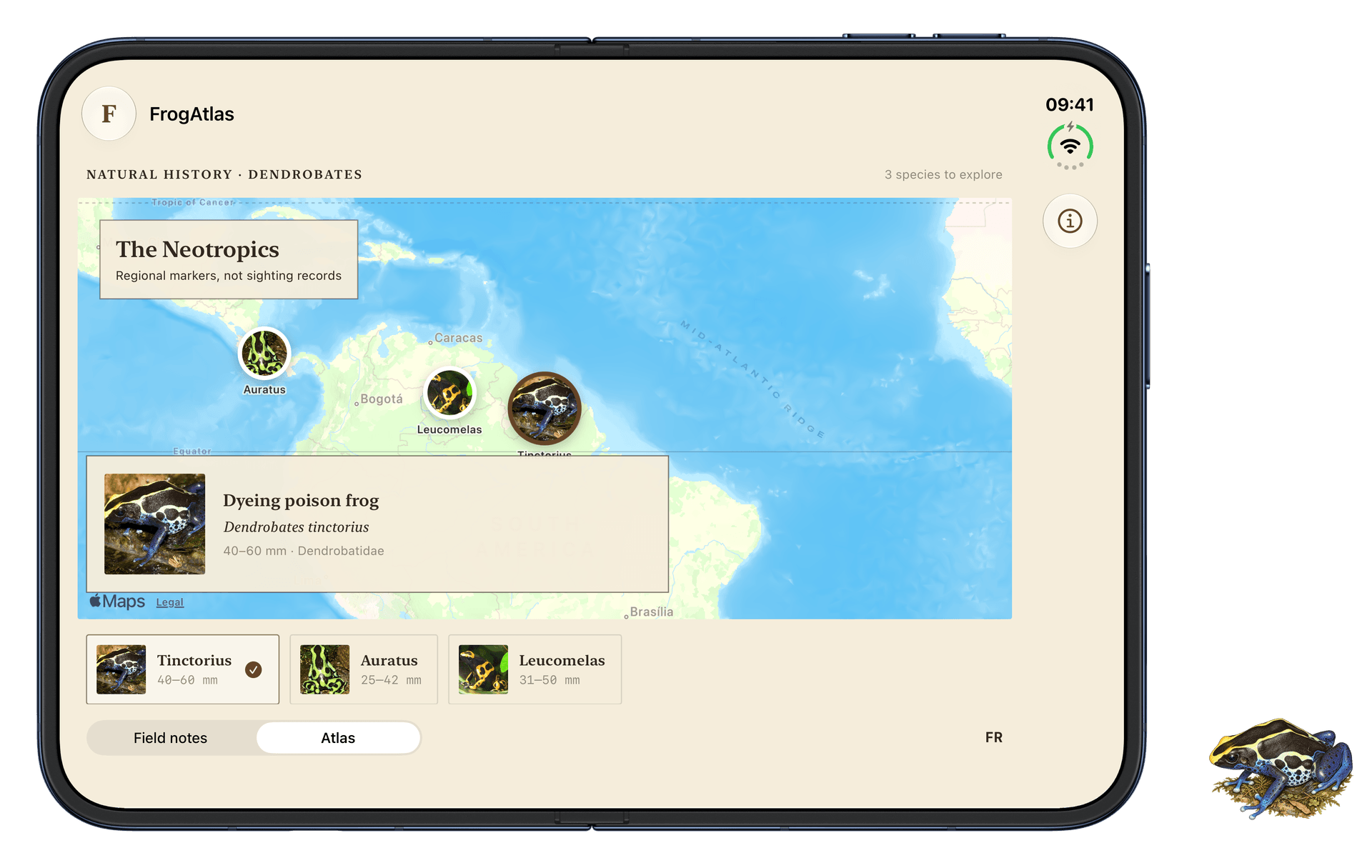
Overlay style on a flat display. The map provides geographical context; the card identifies the selected species. Basemap: Apple Maps.
When the device folds, the container can separate the two views into distinct regions. Keeping exactly the same small card would then leave a lot of useful space empty.
The account stretches its legs; the selection stays
The component can read its position in the arrangement through overlayArrangementZIndex:
struct FrogSelectionPanel: View {
    @Environment(\.overlayArrangementZIndex)
    private var zIndex

    let frog: Frog
    let language: AppLanguage

    var body: some View {
        if zIndex > 0 {
            CompactFrogCard(frog: frog)
        } else {
            FrogInformationView(frog: frog, language: language)
        }
    }
}
CompactFrogCard represents the app’s summary card. When overlaid, it leaves room for the map. Once separated, the account can use its entire region to show more detail.
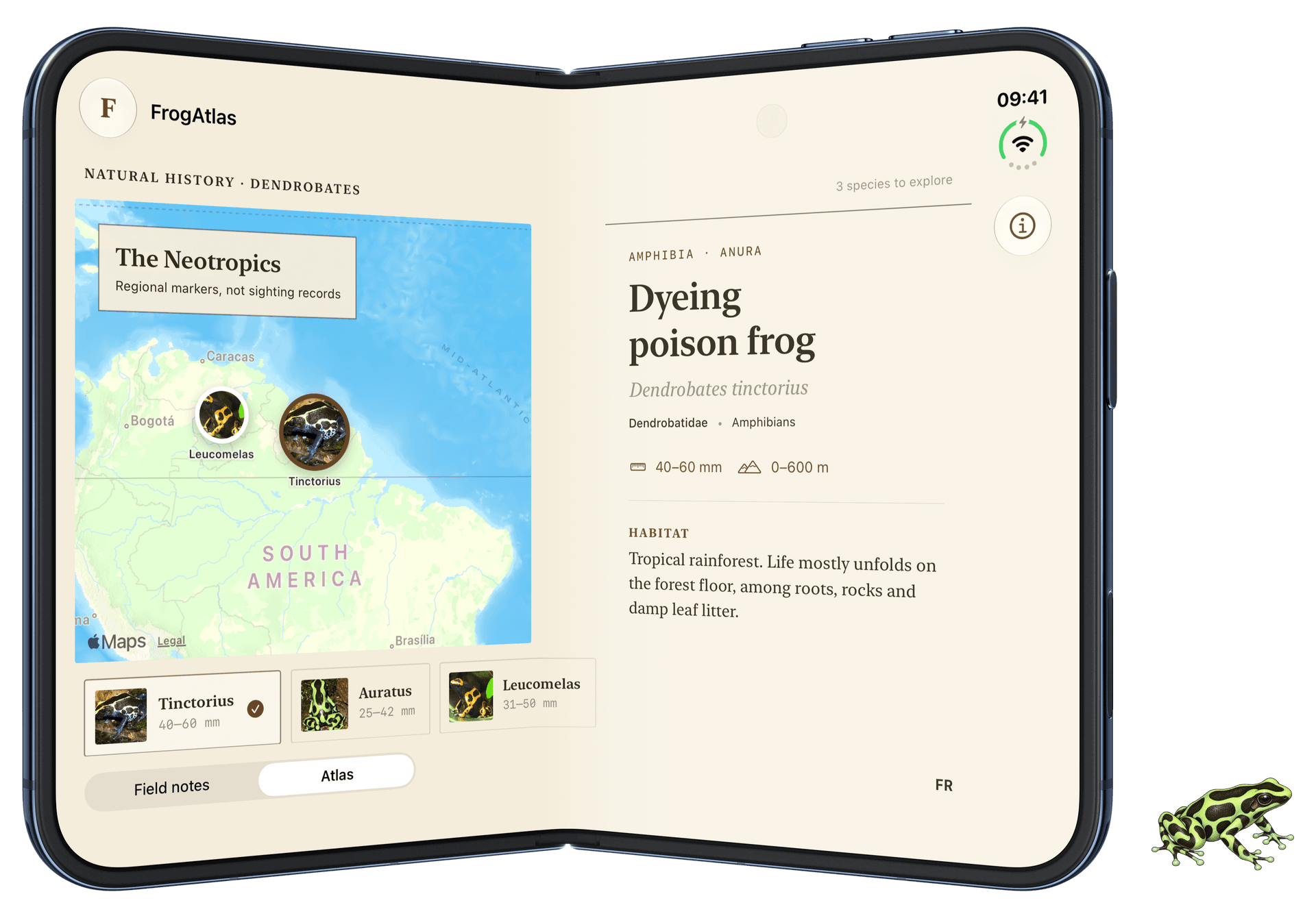
Book-like posture in the simulator. The account gains space without changing species. The central division comes from the device configuration.
The architectural point sits elsewhere: selection state belongs to the parent, above the presentation variants. In FrogAtlas, a stable identifier represents the species, and @AppStorage also preserves it between launches. The phone folds; tinctorius stays tinctorius. Any metamorphosis into auratus at this point deserves a bug report.
The map deserves the same attention. Recreating its state whenever the layout changes can lose the viewport someone chose. A successful transition preserves the work in progress. It does more than produce attractive before-and-after screenshots.
When the device rests on a table, a vertical division can also give the two regions different roles. Content to look at and controls to touch do not necessarily have the same needs. That needs testing in context, particularly for accessibility and reach.
Restricting the overlay needs a reason
As with split, we can limit the supported axes:
.arrangementViewStyle(.overlay.axes(.vertical))This restricts the available ways to separate the views. I would not use it merely to keep the same composition everywhere. A button that stays in place but becomes difficult to reach near the fold has not gained much.
The useful test is still what someone can do. Can they read, compare, select and go back in every posture? If separating the content improves that, I would rather let the container do it.
An atlas should not invent precision
The model keeps scientific information independent of layout:
struct Frog: Identifiable {
    let id: String
    let scientificName: String
    let family: String
    let habitat: String
    let distribution: String
    let sourceURL: URL
}
This is a simplified model for the article. The app adds translations, measurements, photographic credits and the coordinates of its educational markers.
The points on the map are not observations or range boundaries. They locate broad regions. The interface says so explicitly. The “tinctorius” pin is not a frog’s postal address. A point location, a species reported within a country and a mapped distribution are three different levels of information.
A scientific atlas would need documented geographic data, including provenance, dates and uncertainty. Drawing a polygon around a few countries would not solve that problem. It would merely give an approximation a more convincing shape.
I am equally careful with biological measurements. A size range depends on sex, population and available measurements. A conservation status needs a source and a date. For this layout demo, I prefer a few verifiable facts to an account filled with decorative numbers.
What I would check before shipping
Compilation checks types. It does not check readability or continuity. A green build does not mean every frog is sitting comfortably. The demo was built with the iOS 27.1 SDK, and the screenshots were captured by actually changing the simulator’s posture.
For a distributed application, my checklist would be short but demanding:
- retain the selected species through opening, closing and rotation;
- keep essential functions accessible when the secondary view disappears;
- test French and English text at large accessibility sizes;
- check scrolling, VoiceOver and controls close to the fold;
- test transitions on hardware, with someone actually holding the phone.
I would add one last point: do not transform everything just because an API allows it. A scrolling article may already work well. Moving its paragraphs between regions could simply make someone lose their place.
What I take from ArrangementView
I do not see this container as the end of design work. I see a cleaner way to express part of that work.
The data describes the frogs. The components know how to present an account, a photograph or a map. The arrangement organises their relationship within the available space. State keeps track of what someone is doing.
That separation is useful on a folding phone. It is also useful whenever an interface needs to work across several formats without becoming a collection of independent screens.
We write a little less code to position things. We keep the responsibility for deciding what matters.
The frogs can keep hopping. The selection stays put. 🐸
Sources and credits
Documentation consulted on 26 October 2026: ArrangementView, layout ratio, split axis, overlay Z-index, Apple’s session and Designing for iPhone Duo.
Natural history data, paraphrased from Wikipedia: Dendrobates, D. tinctorius, D. auratus, D. leucomelas. Contributors’ text is available under CC BY-SA 4.0. The synonymy of azureus was checked against Amphibian Species of the World, AMNH.
Wikimedia Commons photographs: D. tinctorius — Olaf Leillinger, D. auratus — Wildfeuer, D. leucomelas — Boucaque. All three are licensed under CC BY-SA 3.0, resized and cropped in the interface; those photographic adaptations retain that licence. The D. tinctorius drawing is an AI-generated artistic interpretation after Olaf Leillinger’s photograph, supplied under the same licence. Screenshots: FrogAtlas, iPhone Duo simulator; cartography: Apple Maps, with attribution retained.
The D. auratus sketch in the margins is an AI-generated artistic interpretation after Wildfeuer’s photograph credited above, under CC BY-SA 3.0. These sketches illustrate the article; they are not a guide to identifying species. The iPhone Duo frames come from Apple Design Resources and are covered by the Apple Design Resources licence, separately from the photographs and sketches.
Like every article on this blog, this one started as a human-written draft, then reviewed by AI. The English version was produced with AI assistance. The FrogAtlas code was developed partly with an AI agent. The screenshots were captured by that agent.