My blog, ⌘+F and the ⌘+P podcast now run on Sanity instead of Hygraph. What triggered the move, what I still give Hygraph credit for, where Sanity isn't better, and the checklist I now use to pick a CMS.
Some migrations get postponed because everything works. My site was running. Articles shipped in several languages, the ⌘+P podcast had its RSS feeds, ⌘+F had its home page. Hygraph was doing the job.
And yet it's done: clementsauvage.me, cmdf.io and the ⌘+P podcast now run on Sanity, in production. One project, one content model, seven locales.
This isn't a "Hygraph bad, Sanity good" piece. Hygraph served me well, and it's still an excellent choice for some teams. This is the story of changing needs, with two very concrete triggers — cost and AI — and a broader reflection on how a founder should pick (and leave) a SaaS tool in 2026.
The starting point: a stack that worked
For context, here's what I was running:
- Hygraph as a headless CMS, GraphQL-native
- Next.js 16 (App Router, Turbopack), Tailwind v4
- Apollo Client to talk to the GraphQL API
- next-intl handling seven locales
- Clever Cloud Cellar (S3) behind Cloudflare for part of the files, Mux for video
Nothing exotic. A modern, clean stack that I was still recommending to clients a few months ago.
The problem wasn't a bug. It was a trajectory: more languages, more content, more sites, and a way of working that shifted toward AI agents. At each step, Hygraph cost me a bit more — in money or in friction.
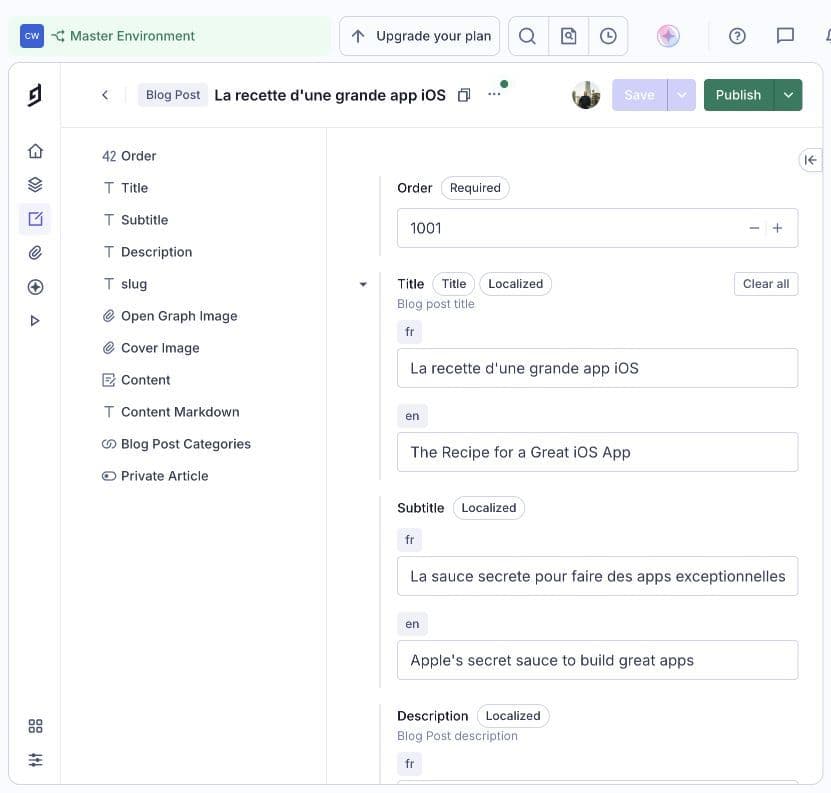
My former Hygraph editor: the French and English titles and subtitles of “The recipe for a great iOS app”, in the same entry. Screenshot of my project, October 2026.
Trigger #1: cost, and above all the cost of languages
Seven locales in a pricing grid built for two or three
This is what started it all. I publish in French and English at a minimum, and my front end handles seven locales. At Hygraph, localization is a resource priced by tier:
- the Hobby plan (free) includes 2 locales;
- the Growth plan starts from $199/month and includes 3 locales;
- beyond that, you're into add-ons and Enterprise territory, priced on request (up to 80 locales).
For an independent creator or a small company that wants to be readable in several languages, that's a wall. Multilingual content isn't a Fortune 500 luxury: it's everyday life for anyone building in Europe. Having it priced as a premium option feels backwards to me.
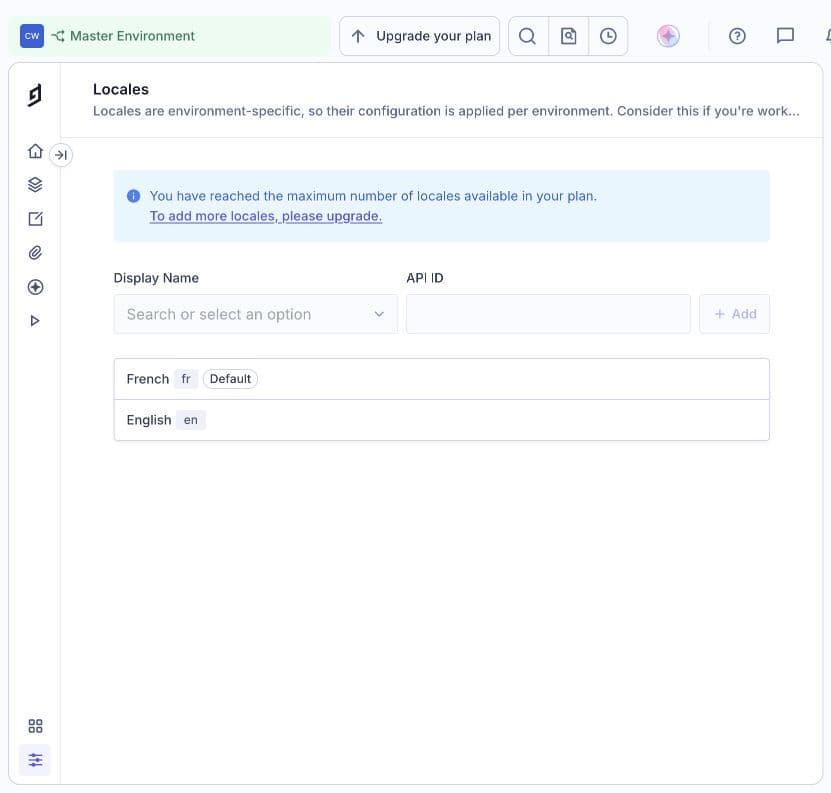
The locales in my Hygraph project: French as the default, English, and the plan limit reached with these two languages. Screenshot of my project, October 2026.
The jump to the paid tier
Second step up: going from free to paid. Hobby is generous in some ways, but it only gives you one environment. As soon as you want a real staging environment to test a schema change without breaking production, you need the next tier. Going from $0 to $199/month at once, for something as basic as a pre-production environment, stops making sense for a personal site and two community projects.
API quotas and asset traffic
Third source of friction, more insidious: quotas.
- 500,000 API operations/month on Hobby, 1 million on Growth. That sounds like a lot until you multiply by locales, generated pages, podcast RSS feeds rebuilt on a schedule, and preview builds.
- 100 GB of asset traffic on Hobby. Podcast covers and article and ⌘+F event visuals add up.
None of these limits is outrageous on its own. Together, across three sites that would have been three Hygraph projects, they add up to a bill that grows faster than the audience.
What Sanity changes here
Sanity works differently:
- Price — Hygraph Hobby : $0 ; Sanity Free : $0.
- Locales — Hygraph Hobby : 2 ; Sanity Free : No cap on the number*.
- Seats — Hygraph Hobby : 3 ; Sanity Free : 20.
- Environments / datasets — Hygraph Hobby : 1 ; Sanity Free : 2 (production + staging).
- API requests — Hygraph Hobby : 500k ops/month ; Sanity Free : 1M CDN requests + 250k API requests/month.
- Assets — Hygraph Hobby : 100 GB traffic ; Sanity Free : 100 GB storage + 100 GB bandwidth.
* Sanity doesn't count languages; it counts "unique attributes" per dataset (2,000 on Free, 10,000 on Growth). With field-level localization, each language multiplies attribute paths, so that's the limit to watch. More on that below.
Prices checked at the end of September 2026 on the official Hygraph and Sanity pages. They change often, so check before you decide.
And when Free isn't enough, Sanity's Growth tier is $15 per seat per month. For a team of two or three, that's well below Hygraph Growth's $199 entry point — with every language included.
Trigger #2: AI, or the CMS as an agent tool
Cost made me look around. AI made me pick Sanity.
The way I write has changed. I draft, translate, review and publish more and more with agents — Claude, Codex — working on my code and my content. The question is no longer "is the editing UI nice?" but: can my agent understand and manipulate my content as well as I can?
Sanity is ahead on that front.
The MCP server: writing into the CMS from Claude or Codex
Sanity ships an official MCP server, hosted at https://mcp.sanity.io. One command wires it up:
npx sanity@latest mcp configure
It detects your editor (Claude Code, Cursor, VS Code) and configures the connection using your CLI credentials. For Claude Code, you can also add it by hand:
claude mcp add Sanity -t http https://mcp.sanity.io --scope user
From there, the agent can query content in GROQ with full knowledge of the schema, create, patch, publish and unpublish documents, manage releases, upload assets from a URL, and deploy the schema.
In practice, my workflow now looks like this: I work on an article with the agent, I review it, and the agent creates the draft directly in Sanity with the right fields, tags and translations. I review it in the Studio and publish. No more copy-pasting between a Markdown editor and a web UI.
Translating into seven languages
With seven locales, translation isn't a detail; it's half the editorial work. Between the MCP server and Sanity's built-in AI features (AI Assist, Agent Actions), I can generate a first pass for each language and then have it reviewed. AI does the heavy lifting; a human keeps the final say, especially on tone and technical terms.
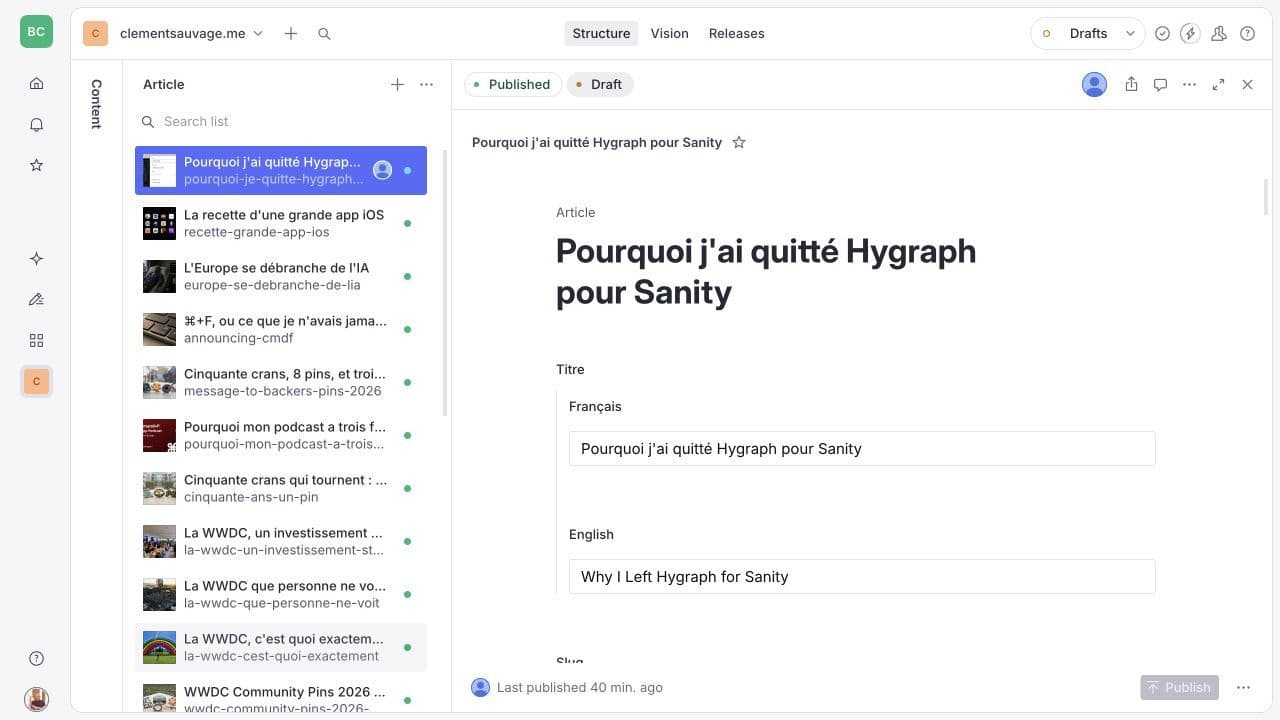
My Sanity Studio: the clementsauvage.me article list, with French and English titles in the same document. Screenshot of my project, October 2026.
Schemas that AI can read
This is the most underrated argument. In Sanity, the content model is TypeScript code, versioned in the repo. When an agent opens my project, it sees the Next.js front end, the queries and the exact definition of every document type at once. It doesn't need to go "discover" the model in a web UI: it reads it, like it reads the rest of the code.
For someone who loves no-code interfaces, that's a downside (more on that below). For an agent, it's decisive: all the context lives in one place.
What changed technically
Field-level localization
I went with field-level localization: one document per article, with fields holding one value per language. The official sanity-plugin-internationalized-array plugin handles it:
// sanity.config.ts
import { defineConfig } from 'sanity'
import { internationalizedArray } from 'sanity-plugin-internationalized-array'
import { LOCALES } from './i18n/locales' // same source of truth as next-intl

export default defineConfig({
  // ...
  plugins: [
    internationalizedArray({
      languages: LOCALES.map((id) => ({ id, title: id.toUpperCase() })),
      fieldTypes: ['string', 'text'],
    }),
  ],
})
// schemas/post.ts
import { defineType, defineField } from 'sanity'

export const post = defineType({
  name: 'post',
  title: 'Post',
  type: 'document',
  fields: [
    defineField({ name: 'title', type: 'internationalizedArrayString' }),
    defineField({ name: 'excerpt', type: 'internationalizedArrayText' }),
    defineField({
      name: 'slug',
      type: 'slug',
      options: { source: (doc: any) => doc.title?.find((t: any) => t.language === 'en')?.value },
    }),
    defineField({ name: 'publishedAt', type: 'datetime' }),
    defineField({ name: 'cover', type: 'image', options: { hotspot: true } }),
  ],
})
Why field-level rather than one document per language? Because my articles share most things — date, visuals, tags, authors — and only the text changes. One document means one source of truth, and an agent translating it only has one object to patch.
A detail that can cost you an evening: since version 5 of the plugin, the language is stored in a language field, no longer in _key. The old _key == "en" examples still floating around the web don't work anymore.
From Apollo and GraphQL to GROQ
This was the biggest front-end job. I dropped Apollo Client in favor of next-sanity, GROQ and TypeGen.
Before, with Hygraph:
// Before — Apollo + Hygraph GraphQL
const GET_POSTS = gql`
  query Posts($locale: Locale!) {
    posts(locales: [$locale, en], orderBy: publishedAt_DESC, first: 10) {
      title
      slug
      excerpt
      coverImage { url }
    }
  }
`
const { data } = await client.query({ query: GET_POSTS, variables: { locale } })
After, with Sanity:
// After — next-sanity + GROQ
import { defineQuery } from 'next-sanity'

export const POSTS_QUERY = defineQuery(`
  *[_type == "post" && defined(slug.current)] | order(publishedAt desc)[0...10]{
    "title": coalesce(title[language == $locale][0].value, title[language == "en"][0].value),
    "excerpt": coalesce(excerpt[language == $locale][0].value, excerpt[language == "en"][0].value),
    "slug": slug.current,
    "cover": cover.asset->url
  }
`)

const posts = await client.fetch(POSTS_QUERY, { locale })
Then:
npx sanity typegen generate
TypeGen generates TypeScript types from the schema and the queries. The result of POSTS_QUERY is typed end to end without writing a single interface by hand.
What I gained: fewer dependencies (no more Apollo, no client cache to configure), a language fallback written right into the query with coalesce, and projections that return exactly the shape the component needs.
What I still give Hygraph credit for
It would be dishonest to stop there. Hygraph has real strengths, and I miss some of them.
- Native GraphQL. It's a standard. Everyone knows it, the tooling is mature, and you're not locked into a home-grown language.
- Native localization. In Hygraph, locales are a first-class feature: tick a language and every field becomes localizable. No plugin, no configuration. It's simpler — it's just priced high.
- The no-code schema builder. A non-technical person can evolve the content model on their own from the UI. In Sanity, that's impossible without touching code.
- Content federation. Plugging in external APIs and exposing everything behind a single GraphQL endpoint is very powerful for a company with scattered data. I didn't need it, but it's a real differentiator.
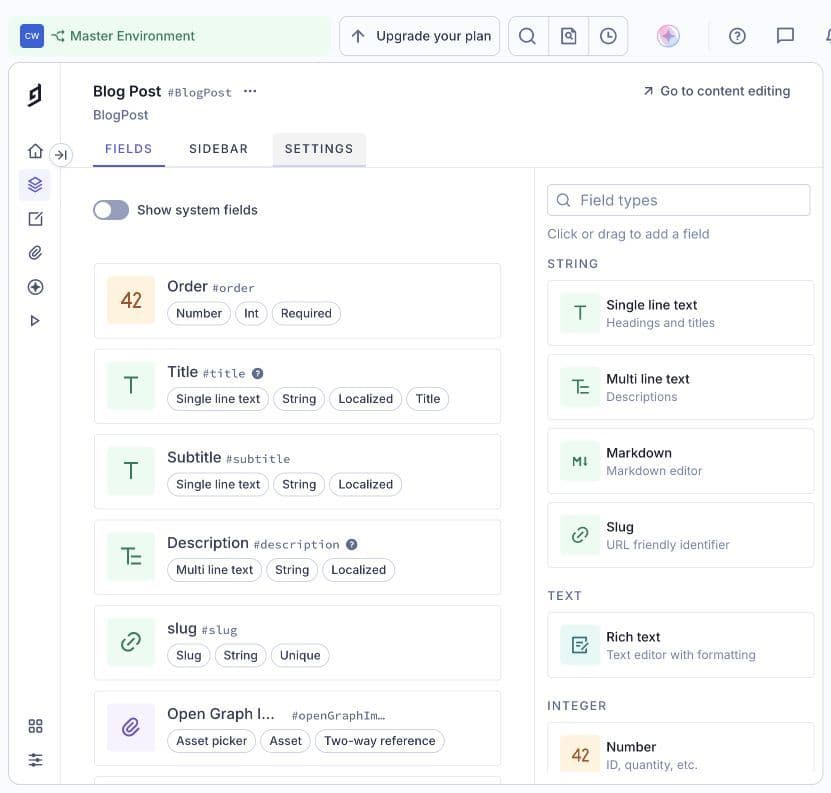
The Blog Post model in my Hygraph project: localized fields and available field types in the schema builder. Screenshot of my project, October 2026.
If you're a mid-sized marketing team with few languages, non-technical editors who want autonomy over the model, and a budget set aside for the CMS, Hygraph is still a very good choice.
My complaint is about one specific thing: its pricing model penalizes small multilingual players. That's a legitimate business decision, but it priced me out of the target.
Where Sanity isn't better
Same honesty the other way.
You have to learn GROQ. It's a proprietary language. It's powerful, concise and pleasant once you know it, but it's a different kind of lock-in: my queries are no longer portable to another CMS. I traded a pricing dependency for a syntax dependency, knowingly. (Sanity also offers a GraphQL API, but you lose much of the point.)
Everything goes through the developer. Schema-as-code is great for a developer and for an agent. For a non-technical editor who wants to add a field, it's a closed door. In my case I'm the developer, so the question doesn't come up. In a team, it does.
i18n is less native. You have to pick a strategy (field or document), install a plugin, handle version migrations (the _key → language change), and watch the dataset's unique-attribute limit, which climbs fast with field-level localization across seven languages. Nothing insurmountable, but it's work Hygraph does for you.
Beyond the CMS: how to pick (and leave) a SaaS tool in 2026
Above all, this migration reminded me of one thing: a tool isn't a permanent choice; it's a choice at a point in time. Hygraph was the right call when I built the stack. It stopped being the right call when my needs changed.
Three lessons I'm keeping, and that I share with the clients I work with.
1. Model cost on your trajectory, not your current situation. Pricing grids are designed to be painless at the start. Ask yourself: what does this cost with twice the languages, content, sites or contributors? That's where the gaps show.
2. In 2026, "can an agent use it?" is a first-tier criterion. A tool with an official MCP server, a model readable as code and a scriptable API will save you hours every week. A tool you can only drive with a mouse will become a bottleneck.
3. Keep your content portable. I could migrate because my content was well structured and I owned the front end. The day you switch tools, the quality of your content model decides whether the migration takes a week or three months.
Checklist: picking a headless CMS
The checklist I now use, for myself and for clients:
Content and languages
- ☐ How many languages today? In two years?
- ☐ Is localization included, capped, or priced per language?
- ☐ Field-level localization, document-level, or both?
Cost
- ☐ What does the next tier cost, and what triggers it (seats, languages, environments, quotas)?
- ☐ How are API calls counted, and what happens when you go over?
- ☐ Is a staging environment included on the free plan?
Team
- ☐ Who evolves the content model: a developer or an editor?
- ☐ Do you need real-time collaboration?
Developer
- ☐ Does the schema live in code, versioned with the front end?
- ☐ Standard query language (GraphQL) or proprietary (GROQ…) — are you ready to learn it?
- ☐ Are types generated automatically?
AI and agents
- ☐ Is there an official MCP server?
- ☐ Can an agent read the schema and create, edit and publish content?
- ☐ Are translation or generation tools built in, and at what cost?
Exit
- ☐ Can you export all your content in an open format?
- ☐ What would a migration cost two years from now?
Answer these questions before you choose and you'll avoid most bad surprises. Answer them after, like I did, and at least you'll know when it's time to leave.
What's next
My whole ecosystem now lives in a single Sanity project: the articles on this blog, ⌘+F content and ⌘+P episodes. One model, seven languages, and agents working directly in the CMS.
Today, I also encourage my clients to migrate to Sanity. Three of them have already made the move. Migrating the content models and several thousand pages took only a few hours — around ten hours for the largest projects. Some clients recouped the cost of their migration within three months.
If you're weighing your content stack, considering a migration, or want to hook your AI agents into your CMS, that's exactly the kind of work I do with BNC Consulting. Drop me a line.
And if you'd rather talk it through with other developers, join the ⌘+F community: we share this kind of hands-on experience at meetups too, over coffee or dinner.
— Clément